QuickBooks and Intuit are a technology company, not a bank. Banking services provided by our partner, Green Dot Bank, member FDIC.
**Product Information:
QuickBooks Payments: QuickBooks Payments account subject to eligibility criteria, credit, and application approval. Subscription to QuickBooks Online required. Money movement services are provided by Intuit Payments Inc., licensed as a Money Transmitter by the New York State Department of Financial Services. For more information about Intuit Payments' money transmission licenses, please visit https://www.intuit.com/legal/licenses/payment-licenses/.
QuickBooks Money: QuickBooks Money is a standalone Intuit offering that includes QuickBooks Payments and QuickBooks Checking. Intuit accounts are subject to eligibility criteria, credit, and application approval. Banking services provided by and the QuickBooks Visa® Debit Card is issued by Green Dot Bank, Member FDIC, pursuant to license from Visa U.S.A., Inc. Visa is a registered trademark of Visa International Service Association. QuickBooks Checking Deposit Account Agreement applies. Banking services and debit card opening are subject to identity verification and approval by Green Dot Bank. Money movement services are provided by Intuit Payments Inc., licensed as a Money Transmitter by the New York State Department of Financial Services.
QuickBooks Checking account: Banking services provided by and the QuickBooks Visa® Debit Card is issued by Green Dot Bank, Member FDIC, pursuant to license from Visa U.S.A., Inc. Visa is a registered trademark of Visa International Service Association. Green Dot Bank operates under the following registered trade names: GoBank, GO2bank and Bonneville Bank. Registered trade names are used by, and refer to, a single FDIC-insured bank, Green Dot Bank. Deposits under any of these trade names are deposits with Green Dot Bank and are aggregated for deposit insurance coverage up to the allowable limits. Green Dot is a registered trademark of Green Dot Corporation. ©2022 Green Dot Corporation. All rights reserved. QuickBooks products and services, including Instant Deposit, QuickBooks Payments, Cash flow planning / forecasting are not provided by Green Dot Bank.
QuickBooks Card Reader: Data access subject to cellular/internet provider network availability and occasional downtime due to system and server maintenance. Product registration and QuickBooks Payments account required. Terms, conditions, and features subject to change.
Apple Pay: Apple Pay is a registered trademark of Apple Inc.
Google Pay: Google Pay is a trademark of Google LLC.
PayPal and Venmo: Not currently available on invoicing through QuickBooks Online Advanced subscription.
**Features:
Automatic matching: QuickBooks Online will only match bank deposits with transactions processed through QuickBooks Payments. Not all transactions are eligible and accuracy of matches is not guaranteed.
Pay-enabled invoices: Requires a separate QuickBooks Payments account which is subject to eligibility criteria, credit and application approval. E-invoicing QuickBooks Payments is an optional fee-based service. Additional fees may apply. Additional terms and conditions apply.
Instant deposit: Instant Deposit: Instant deposit is an additional service offered by QuickBooks Payments subject to eligibility criteria, including delayed eligibility for new users and availability for only some transactions and financial institutions. The service carries a 1.75% fee in addition to standard rates for ACH, swiped, invoiced, and keyed card transactions. This 1.75% fee does not apply to payments deposited into a QuickBooks Checking account. Deposits are sent to the financial institution or debit card that you have selected to receive instant deposits in up to 30 minutes. Transactions between 2:15 PM PT and 3:15 PM PT are excluded and processed the next day. Deposit times may vary due to third party delays.
Same-day deposit: Same Day Deposit allows you to have near-real time deposits sent to you on a predetermined daily schedule (up to 3x a day, Monday through Sunday, including holidays). Same Day Deposit is an additional service offered by QuickBooks Payments subject to eligibility criteria, for no extra fee for QuickBooks Money users. QuickBooks Money payment request fees apply for ACH and card transactions. Once batched, eligible deposits will be sent to your QuickBooks Money account, and will be available in up to 30 minutes. Transactions between 2:15-3:00 pm PST are excluded and transactions after 9:00 pm PST will be available for deposit the following morning. Deposit times may vary for third party delays.
Next-day deposit: Next-day deposit feature subject to eligibility criteria. Payments processed before 3:00 PM PT typically arrive at your bank the next business day (excluding weekends and holidays). Deposit times may vary for other payment methods, third party delays or risk reviews.
Automatic sales tax: Underlying sales tax rates are estimated based on the location information associated with each individual transaction. Additional factors that may impact sales tax rates include product type, date, and customer type. Tax information needs to be validated prior to submitting to the IRS.
Business network: The AP Automation feature is not available for Simple Start customers. Use of the QuickBooks Business Network for spam, marketing, or other activities which violate applicable Intuit Terms of Service is strictly prohibited. You may only view and connect with other QuickBooks Business Network members located in your geography. All Business Information is provided by QuickBooks Online customers and is not independently verified or endorsed by Intuit. Intuit reserves the right to limit your use of the QuickBooks Business Network, including your ability to connect with other members and be listed in the network per our Intuit Terms of Service.
Payment Dispute Protection: Payments Dispute Protection ("PDP") is an additional service that covers you for certain payment disputes (i.e. "chargebacks") that your customer initiates through its card issuer associated with a credit or debit card transaction on the American Express, Discover, Mastercard or Visa networks and are processed by QuickBooks Payments while you are enrolled in PDP. You must be enrolled in PDP when both the customer's payment is processed and payment dispute is initiated to receive coverage. Payment disputes covered by PDP are subject to a per-payment dispute coverage limit of $10,000 with a total annual coverage limit of $25,000 for all payment disputes received on a rolling 365-day period. Payment disputes related to transactions processed by QuickBooks Payments prior to 3 PM PT on your enrollment day will not be covered if you enrolled in PDP after 3 PM PT. The PDP service fee ranges from .99% to 1.99%, based on eligibility criteria. Terms, conditions, and service fee subject to change without notice.
Annual percentage yield: The annual percentage yield (“APY”) is accurate as of December 31, 2023 and may change at our discretion at any time. The APY is applied to deposit balances within your primary QuickBooks Checking account and each individual envelope. We use the average daily balance method to calculate interest on your account. See Deposit Account Agreement for terms and conditions.
Envelopes: You can create up to 9 Envelopes within your primary QuickBooks Checking account. Money in Envelopes must be moved to the available balance in your primary QuickBooks Checking account before it can be used. Envelopes within your primary QuickBooks Checking account will automatically earn interest once created. At the close of each statement cycle, the interest earned on funds in your Envelopes will be credited to each Envelope in proportion to the average daily balance of each Envelope. See Deposit Account Agreement for terms and conditions.
National average interest rate: The average interest rate is based on the Federal Deposit Insurance Corporation's national rate published the week of August 15th, 2022. Learn more.
No minimum balances or monthly fees: There are no minimum balance requirements to open or maintain this account or obtain the listed APY. Other fees and limits apply. See Deposit Account Agreement for details.
Fee-free ATM withdrawals: Fee-free ATM access applies to in-network AllPoint ATMs only (up to 4 withdrawals per statement cycle). For out-of-network ATMs and bank tellers, a $3 fee will apply, plus any additional fees charged by the ATM owner or bank. See app for fee-free ATM locations.
Bill Pay: QuickBooks Bill Pay is an additional product capability to QuickBooks Payments that may require a separate subscription. Money movement services are provided by Intuit Payments Inc., licensed as a Money Transmitter by the New York State Department of Financial Services.
Mobile Remote Deposit Capture: Limited availability to existing customers on iOS and Android. Features may be more broadly available soon, but represents no obligation and should not be relied on in making a purchasing decision. Mobile deposits may take up to 5 business days. Limits on the dollar amount(s) and/or number of checks that may be deposited may apply. QuickBooks Checking account's Deposit Account Agreement applies.
#Claims
Over 70x U.S. average APY: Average interest rate: The average interest rate is based on the Federal Deposit Insurance Corporation's national rate published the week of October 16, 2023. Learn more.
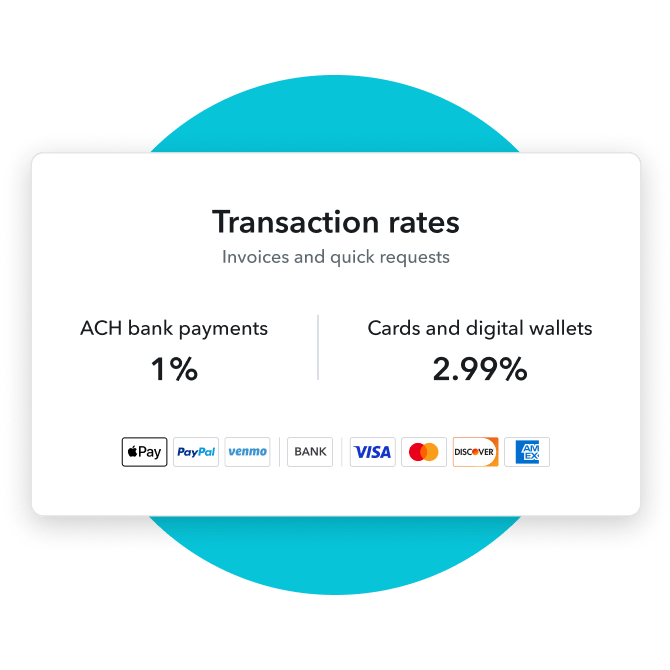
Move/switch to QuickBooks Payments and you could save up to 25%: based on U.S. customers using QuickBooks Online from May 2022 to May 2023. Savings based on estimated monthly cost on discounted payments pricing plans versus standard pricing. Savings vary monthly based on actual processing volume and transaction type. QuickBooks Online customers who primarily take payments with ACH bank payments saw the highest savings.